Versioned DuckDB databases, locally or replicated through S3, for people and agents
What if a DuckDB database could have a history, writable branches and read replicas on other machines, all from SQL, with nothing but an S3 bucket in between? No database server, no catalog service, no lock manager.
That’s what the differential extension for DuckDB in v1.0 does. A week ago I wrote about differential storage for DuckDB and the local workflows it enables: validating imports on branches, reproducing reports, testing migrations on clones. Version 1.0 is built for DuckDB 2.0 and adds what was missing to use the same databases across machines:
- Continuous WAL shipping (
SHIP_WAL): every commit of a database reaches S3, within a second or before the commit returns. - Followers (
FOLLOW true): read-only replicas on other hosts that move to each new commit on their own. - Failover (
differential_recover_branch): another host takes over a branch as of its last shipped commit. - Remote garbage collection (
differential_cleanup_remote_files): S3 data no branch or snapshot needs anymore is cleaned up.
Together with the existing S3 exports and shared multi-writer databases, this turns a plain DuckDB file into something that behaves a lot like a replicated database, while DuckDB itself stays completely unmodified.
Getting started#
The extension is available from the community repository for DuckDB 2.0 on Linux and macOS:
INSTALL differential FROM community;
LOAD differential;
SET differential_repository = '/absolute/path/differential-demo';
The repository is a local directory that holds every database you create, their versions and some metadata. You don’t need anything else for the local part.
Upgrading from 0.1.0? Version 1.0 uses a new storage format (store format 2) and does not open repositories or exports written by 0.1.0. There is no migration, so recreate test data with 1.0.
The local lifecycle in five minutes#
Let’s walk through the full lifecycle of one database. Run the blocks in order in the same session. A database is created on its first ATTACH:
ATTACH 'differential:analytics' AS analytics;
CREATE TABLE analytics.pageviews (day DATE, page VARCHAR, views INTEGER);
INSERT INTO analytics.pageviews VALUES
    ('2026-10-01', '/pricing', 120), ('2026-10-01', '/docs', 340),
    ('2026-10-02', '/pricing', 95),  ('2026-10-02', '/docs', 410);
CALL differential_create_snapshot('analytics', name => 'october-import');  -- snapshot 1
A snapshot retains the database’s state under a number (and optionally a name, author and message). Now we change the data and take another snapshot, and the old state stays queryable with AT:
DELETE FROM analytics.pageviews WHERE page = '/pricing';
CALL differential_create_snapshot('analytics', name => 'docs-only',
    message => 'dropped pricing rows');                                   -- snapshot 2

SELECT sum(views) FROM analytics.pageviews;                     -- 750
SELECT sum(views) FROM analytics.pageviews AT (VERSION => 1);   -- 965
SELECT snapshot_id, snapshot_name, commit_message FROM analytics.snapshots();
-- 1 october-import NULL
-- 2 docs-only      dropped pricing rows
A branch is a writable continuation of a snapshot. Here we model a what-if scenario without touching main:
CALL differential_create_branch('analytics', 'what-if', snapshot => 1);
ATTACH 'differential:analytics' AS whatif (BRANCH 'what-if');
UPDATE whatif.pageviews SET views = views * 2 WHERE page = '/pricing';
SELECT sum(views) FROM whatif.pageviews;                        -- 1180
CALL differential_create_snapshot('whatif', name => 'double-pricing');  -- snapshot 3
DETACH whatif;

SELECT sum(views) FROM analytics.pageviews;                     -- still 750
Deleting the pricing rows was a mistake, so let’s restore main to snapshot 1. Restore needs the branch detached, and it preserves the replaced state instead of throwing it away:
DETACH analytics;
CALL differential_restore('analytics', 1);                      -- creates snapshot 4
ATTACH 'differential:analytics' AS analytics;
SELECT sum(views) FROM analytics.pageviews;                     -- 965
A clone is an independent database with its own identity and history, which is handy for a sandbox or a test run. It shares all unchanged data with its source:
CALL differential_clone_database('analytics', 'analytics_sandbox', snapshot => 1);
ATTACH 'differential:analytics_sandbox' AS sandbox;
SELECT count(*) FROM sandbox.pageviews;                         -- 4
DETACH sandbox;
Finally, history needs maintenance. Dropping a branch doesn’t expire its snapshots, so we expire what we no longer need and collect the data only they referenced:
DETACH analytics;
CALL differential_drop_branch('analytics', 'what-if');
CALL differential_expire_snapshots('analytics', versions => [2, 3]);
CALL differential_cleanup_old_files(cleanup_all => true);
SELECT database_name FROM differential_databases();             -- analytics, analytics_sandbox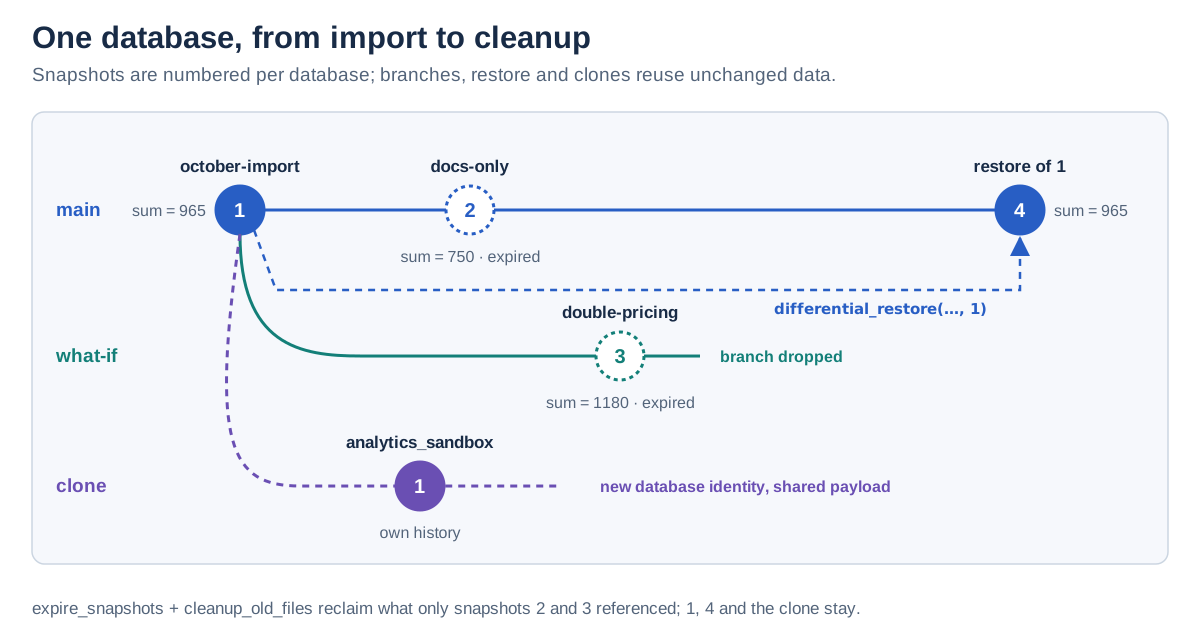
That’s the whole local lifecycle: create, snapshot, time travel, branch, restore, clone, expire and clean up. The previous post goes much deeper into the workflows these enable.
Taking it to S3#
A database becomes an S3 database by giving it an S3 DATA_PATH when it is created. Credentials come from a scoped DuckDB TYPE s3 secret or the AWS SDK credential chain; the extension never accepts them as ATTACH options and never writes them anywhere:
CREATE SECRET lake (
    TYPE s3,
    PROVIDER credential_chain,
    REGION 'eu-central-1',
    SCOPE 's3://my-bucket/lake/'
);
ATTACH 'differential:orders' AS orders (DATA_PATH 's3://my-bucket/lake/');
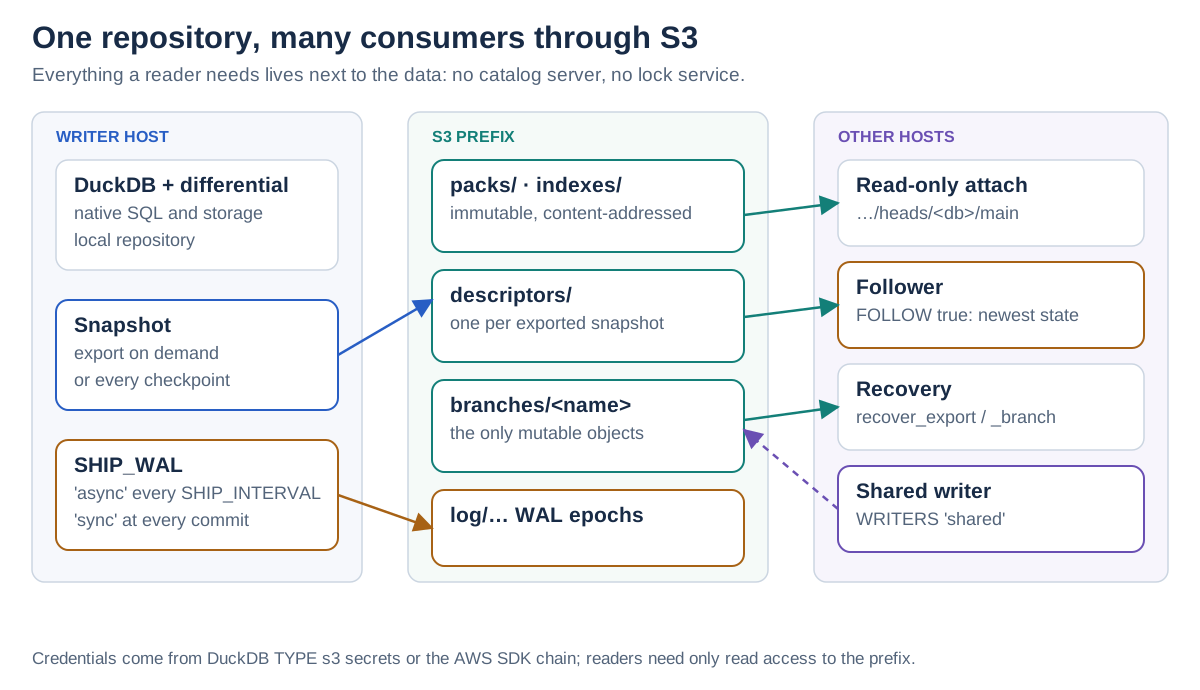
From then on, every snapshot is exported to S3 as immutable, content-addressed objects, and each branch gets a branch head: the only mutable object, pointing at its newest export. Any host with read access can attach a branch head read-only, without the writer’s repository and without downloading the whole database first. Reads fetch verified ranges on demand and are cached in DuckDB’s external file cache:
ATTACH 'differential:s3://my-bucket/lake/heads/orders/main' AS orders_latest;That was already possible in 0.1.0. With 1.0, the interesting part is what happens between snapshots.
Use case: leader/follower DuckDB#
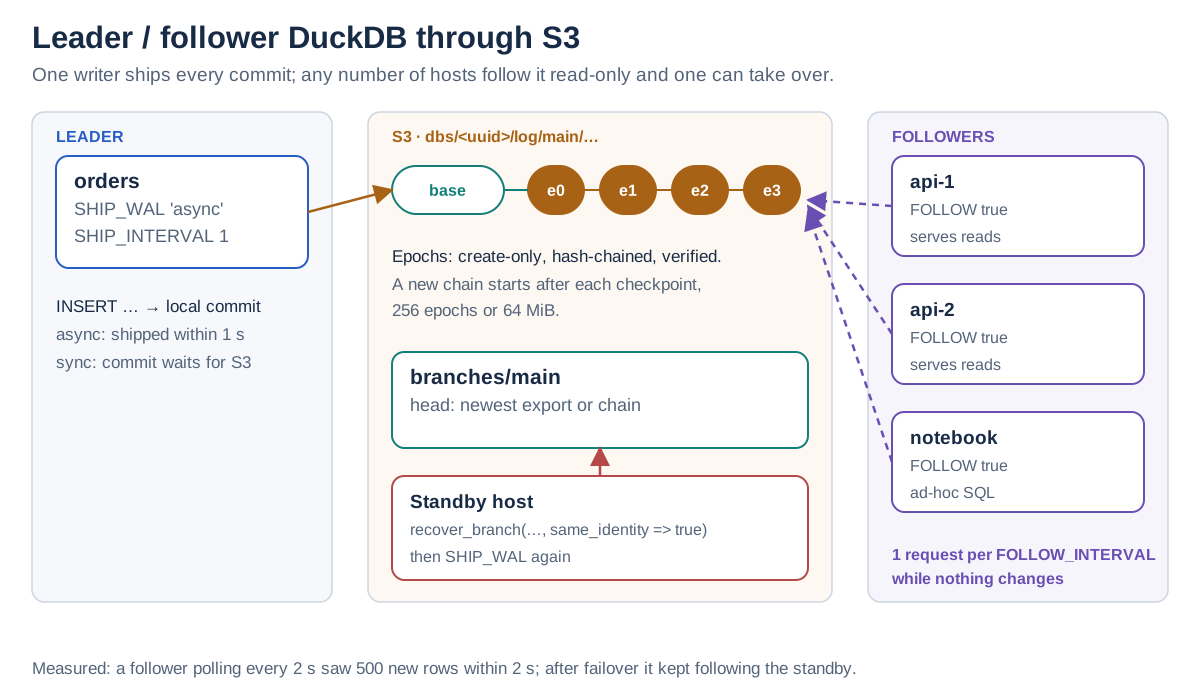
A classic setup for read-heavy workloads is one writer and many readers: an ingestion service writes, while API servers, dashboards or notebooks query. With plain DuckDB that usually means copying files around. With 1.0, the writer ships every commit to S3:
-- leader
ATTACH 'differential:orders' AS orders (
    DATA_PATH 's3://my-bucket/lake/', SHIP_WAL 'async', SHIP_INTERVAL 1
);
CREATE TABLE orders.orders (id INTEGER, amount DECIMAL(10, 2));
INSERT INTO orders.orders SELECT range, range % 100 FROM range(1000);
SHIP_WAL is stored with the database, so later writable attachments keep shipping until you turn it 'off'. Each published state becomes an epoch: an immutable, hash-chained object with the WAL bytes and changed chunks inline. A new chain starts from a base export after each checkpoint (or after 256 epochs or 64 MiB), so recovery never replays a long history.
On any number of other hosts, a follower attaches the branch head with FOLLOW true:
-- follower (any other host)
ATTACH 'differential:s3://my-bucket/lake/heads/orders/main' AS orders_live (
    FOLLOW true, FOLLOW_INTERVAL 2
);
SELECT count(*) FROM orders_live.orders;                        -- 1000
A background thread checks S3 every FOLLOW_INTERVAL seconds and opens the newest state as soon as there is one. When the leader inserts 500 more rows, the follower sees them on its own:
-- leader
INSERT INTO orders.orders SELECT range, range % 100 FROM range(1000, 1500);

-- follower, a moment later
SELECT count(*) FROM orders_live.orders;                        -- 1500
SELECT alias, follows FROM differential_followers();            -- orders_live, commits
In my tests with a 2-second interval, the follower picked up the new rows within 2 seconds. Each transaction reads exactly one state, so a query never sees half a commit, and the next transaction reads the newest one. While nothing changes, a follower costs one request per interval.
You choose the durability per database:
| Mode | A commit returns after | Losing the leader loses |
|---|---|---|
SHIP_WAL 'async' | its local commit; shipped within SHIP_INTERVAL | at most SHIP_INTERVAL of commits |
SHIP_WAL 'sync' | its local commit and its epoch in S3 | no acknowledged commit |
S3 requests cost money, so the interval matters. At AWS’s us-east-1 prices, a busy branch in async mode costs about $13 a month at the default 1-second interval and about $1.30 at 10 seconds. sync mode costs one PUT per commit. An idle branch costs nothing, and an idle follower about $0.10 a month at its default 10-second interval. The API docs have the full cost table.
Use case: failover#
If the leader is gone, a standby host recovers the branch from S3 as of its last shipped commit. With same_identity => true it continues as the same database, so followers keep following:
-- standby host, with its own repository
SELECT database_name, shipped_epoch
FROM differential_recover_branch('s3://my-bucket/lake/heads/orders/main', 'orders',
    same_identity => true);
ATTACH 'differential:orders' AS orders (SHIP_WAL 'async');
SELECT count(*) FROM orders.orders;                             -- 1500
INSERT INTO orders.orders VALUES (1500, 42.00);                 -- followers now see 1501
Recovery imports the newest chain’s base without downloading it (it’s read from S3 on demand) and applies every verified epoch; DuckDB then replays the WAL natively. The new leader continues in a newer chain. If the old leader comes back and tries to ship the same branch, it gets a head_conflict instead of forking the history.
This is not automatic failover. Deciding that the leader is dead, and making sure it stays dead, is up to your orchestration (a health check, a lease in your scheduler, a human). Differential makes the takeover itself safe and fast.
Use case: several writers without a lock service#
Sometimes more than one host needs to write the same database: two pipelines, a laptop and a CI job, several containers. A shared database allows that, with optimistic publication instead of locks:
-- host A
ATTACH 'differential:team' AS team (DATA_PATH 's3://my-bucket/lake/', WRITERS 'shared');
CREATE TABLE team.tasks AS SELECT range AS id, 'open' AS status FROM range(100);
SELECT snapshot_id FROM differential_create_snapshot('team', name => 'initial');   -- 1

-- host B
ATTACH 'differential:team' AS team (DATA_PATH 's3://my-bucket/lake/', WRITERS 'shared');
UPDATE team.tasks SET status = 'done' WHERE id < 10;
SELECT snapshot_id FROM differential_create_snapshot('team', message => 'closed 10 tasks');  -- 2
Every host writes locally at native speed. Publishing moves the branch head with a conditional S3 write, and only from the version the writer started from. When host A, still based on snapshot 1, now publishes its own change, it doesn’t overwrite host B’s work:
-- host A
UPDATE team.tasks SET status = 'blocked' WHERE id = 50;
SELECT snapshot_id FROM differential_create_snapshot('team', message => 'blocked task 50');
-- IO Error: [differential:branch_conflict] Branch main of database team moved in S3
-- to snapshot 2, published by another writer, since this repository last saw it at snapshot 1. ...
No update is lost: host A’s work is kept as snapshot 3. Host A decides what to do with it, for example keep it on a branch and let main follow S3:
DETACH team;
SELECT kept_branch FROM differential_resolve_conflict('team', keep => 'branch');  -- main-conflict-3
ATTACH 'differential:team' AS team;
SELECT count(*) FROM team.tasks WHERE status = 'done';          -- 10, host B's work
With ON_CONFLICT 'branch' on ATTACH, the fork happens automatically and the call succeeds. There is no automatic merge of concurrent changes to one branch. Reconciling two versions is SQL you write, which is honestly what you want for data.
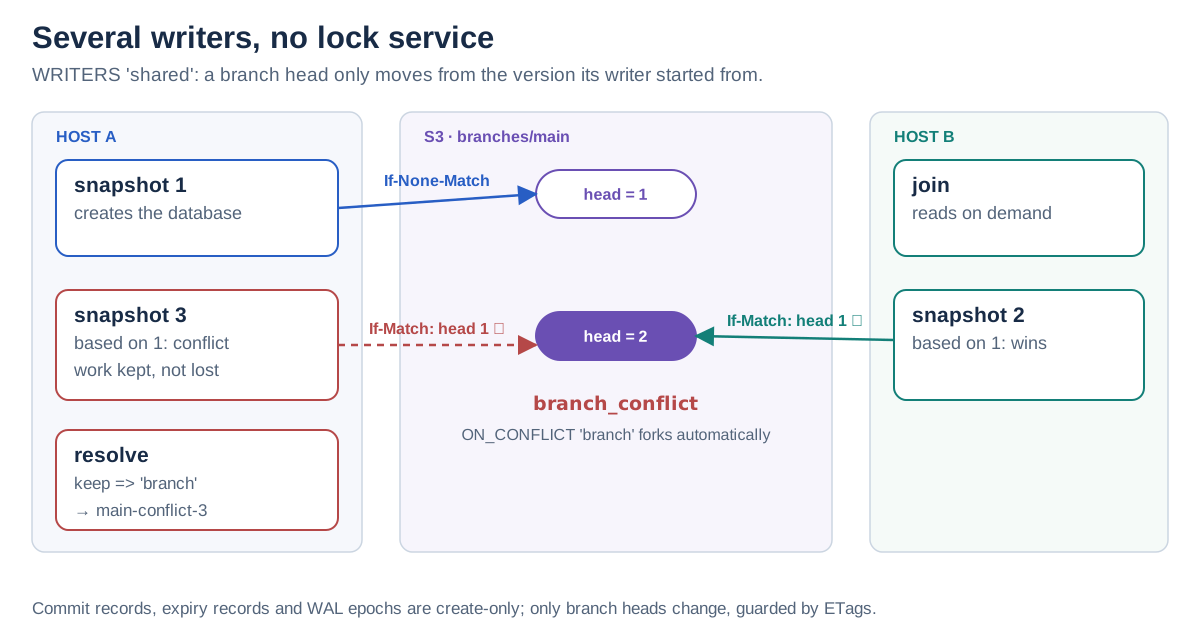
All the metadata (commit records, expiry records, branch heads, advisory “being written” markers) lives in S3 next to the data. Commit records, expiry records and epochs are create-only; branch heads are guarded by ETags. The shared-database guide walks through branches across hosts, conflicts and failure recovery.
More things this enables#
- Publishing datasets. A snapshot’s export locator (
descriptors/<sha256>) is an immutable, verifiable reference to one version. Hand it to a colleague, a report or a downstream job, and everyone reads exactly the same data. - Ephemeral compute. A container, CI job or function can attach a branch head or follow a branch without a local copy, reading only the ranges its queries need. An optional disk cache (
differential_remote_cache_size) shares fetched chunks across processes of a repository. - Disaster recovery.
differential_recover_exportturns any completed export into a new writable local database, anddifferential_recover_branchdoes the same from the shipped WAL. Neither needs the original writer. - Tidy buckets.
differential_cleanup_remote_filescondemns S3 data that no branch head or unexpired snapshot reaches, and deletes it in a later run after a grace period (a week by default). A dry run shows what it would do:
SELECT * FROM differential_cleanup_remote_files('s3://my-bucket/lake/', dry_run => true);
-- dry_run  roots  live_objects  unreachable_objects  ...  deleted_objects
-- true 4 13 0 ... 0Architecture#
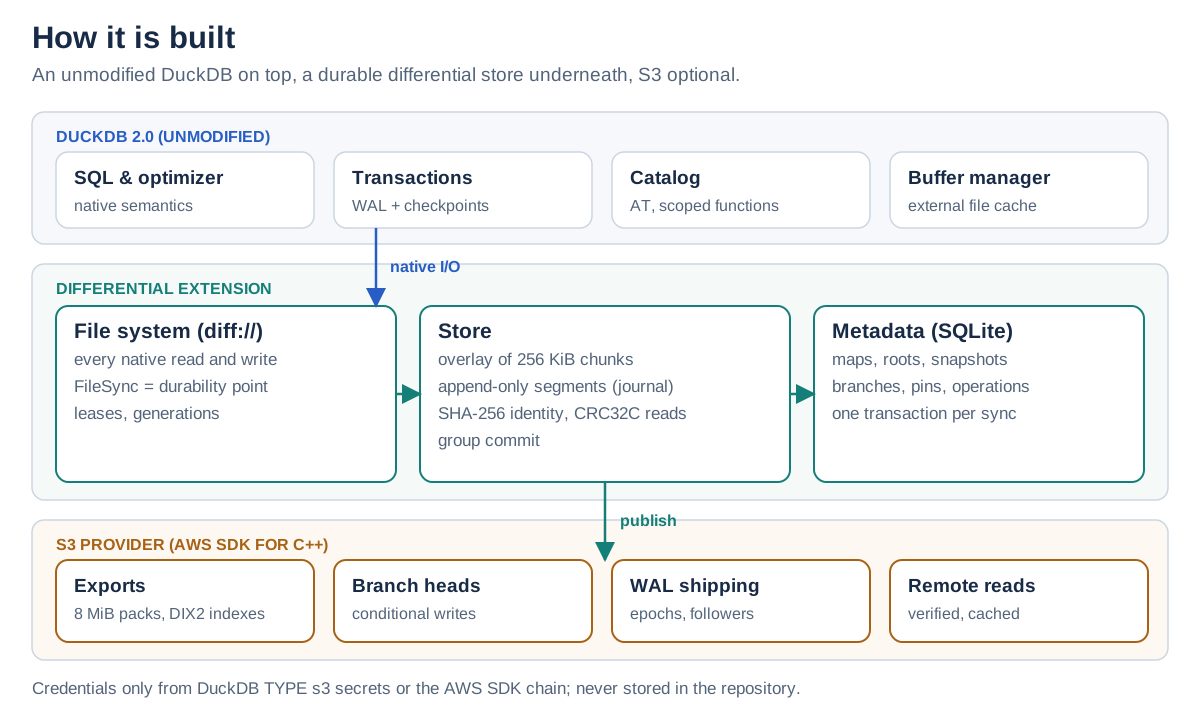
The most important design decision: DuckDB is not modified. It runs its normal SQL, transactions, WAL, checkpoints and storage format, and it reads and writes an ordinary native database file. The extension sits underneath, as a file system, and around it, as a catalog:
- The catalog is a subclass of DuckDB’s own catalog. It adds
AT (VERSION | TIMESTAMP)time travel and the catalog-scoped functions likeanalytics.snapshots(). Time travel opens a hidden read-only attachment of the retained snapshot. - The file system handles every read and write DuckDB makes to
diff://paths. DuckDB’sFileSyncis the durability point, exactly as for a native file. - The store keeps writes in an in-memory overlay and appends them to an append-only segment before
write()returns. At a sync, it hashes the changed chunks and publishes them in one SQLite transaction. - The metadata store is an embedded SQLite database (WAL mode,
synchronous=FULL) with chunk maps, roots, snapshots, branches, reader pins and operations. No separate service, and several processes can share one repository. - The S3 provider uses the AWS SDK for C++ for exports, branch heads, WAL shipping, remote reads and garbage collection.
Storage details#
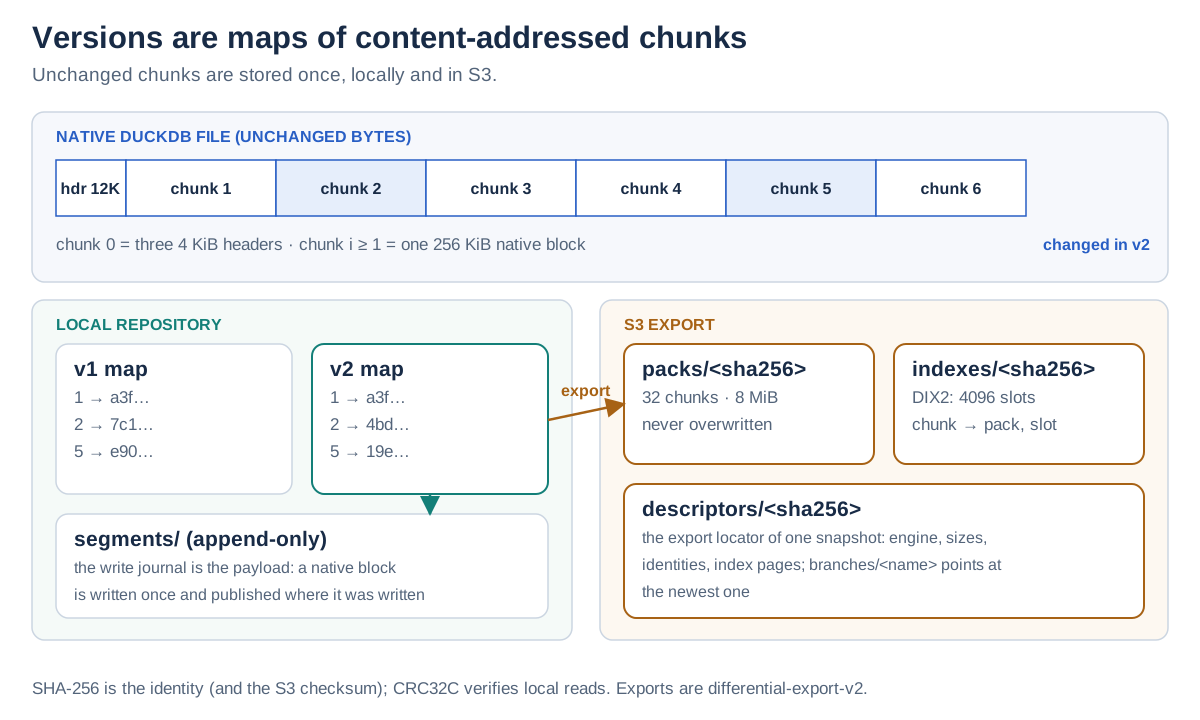
The core idea is simple: a version of a file is a map from chunk index to a content hash.
The native database file is split into a 12 KiB first chunk, which isolates DuckDB’s three 4 KiB headers, followed by 256 KiB chunks. 256 KiB is exactly DuckDB’s default block size, so one chunk holds one native data block. Every chunk is stored once under its SHA-256, which means versions, branches and clones share every chunk that didn’t change. Creating a branch copies a map, not data.
WAL files are stored differently, as byte ranges pointing at the records that wrote them. An append to the WAL stores only the appended bytes.
Locally, the chunks live in the segments that also serve as the write journal: a native block is written once and published right where it was written, with no second copy. Local reads are verified with hardware-accelerated CRC32C; SHA-256 stays the identity. Concurrent syncs of different databases share one SQLite transaction and device flush (group commit).
In S3, an export uploads only chunks the bucket hasn’t seen yet:
- packs (
packs/<sha256>): up to 32 chunks, 8 MiB, written once and never overwritten; - index pages (
indexes/<sha256>): 4096 chunk slots each, mapping every chunk to a pack and slot; - a descriptor (
descriptors/<sha256>) per exported snapshot: its export locator; - branch heads (
branches/<name>): the only mutable objects, written conditionally; - commit records, expiry records and WAL epochs: create-only.
Every upload carries an SHA-256 checksum that S3 verifies (x-amz-checksum-sha256), and a later export references earlier packs, also those of other databases in the same prefix, so a clone’s export reuses the packs of its source.
Durability boundaries are explicit. A local commit is durable at DuckDB’s sync point, like a native file (segment fsync, then SQLite FULL). A snapshot is recoverable from S3 once its export completed, and a commit once its epoch is in S3 ('sync' waits for that). The storage format and durability docs specify all of it.
How fast is it?#
I ran TPC-H at scale factor 1 (Q1 to Q22, 4 threads) on an 8 GB Intel Mac against every backend, with the S3 storage served from the same machine. All results are hashed and must match native DuckDB. A few numbers from the benchmark report, as sums of median query times:
| Backend | Sum of medians | vs. reference |
|---|---|---|
| Native DuckDB file (warm) | 900 ms | 1.00× |
| Differential, local (warm) | 1,057 ms | 1.15× |
| Native file on S3 via httpfs (cold) | 19,982 ms | 1.00× |
| Export from a branch head (cold) | 21,411 ms | 1.06× |
Follower (FOLLOW true, cold) | 21,094 ms | 1.05× |
| Export with a warm disk cache | 2,677 ms | 0.14× |
Locally, versioning costs about 15% on warm reads. Reading through S3 is roughly on par with reading the native file through httpfs, and a warm repository disk cache makes repeated cold reads about 7× faster than httpfs. These are development measurements on one machine, not a performance promise. The benchmark is a script (make bench-tpch), so you can run it on your own hardware.
Limits and status#
The extension is still experimental, and I’d rather be upfront about what it doesn’t do:
- Linux and macOS only. It depends on POSIX file locking,
fsyncandmmap. - No merge. Branches and conflicts are kept, never merged automatically.
- No automatic failover. Recovery is one SQL call, but deciding when to fail over is yours.
- No security sandbox. Branches separate data, not permissions; repository access allows addressing every database in it.
- Fully tested on S3-compatible storage; on AWS so far exercised for exports and reads. Power-loss behaviour is not verified.
- Not compatible with 0.1.0 data, as mentioned above.
Wrapping up#
With 1.0, a DuckDB database gets more than a history. It gets replicas on other machines that stay current within seconds, a failover path that needs no special infrastructure, and multiple writers coordinated by nothing but conditional writes on S3. All of it lives next to the data in a bucket you already have, and DuckDB itself runs unchanged.
Try it, break it, and let me know what you built or where it fell short: the source, the SQL reference and the issue tracker are on GitHub.