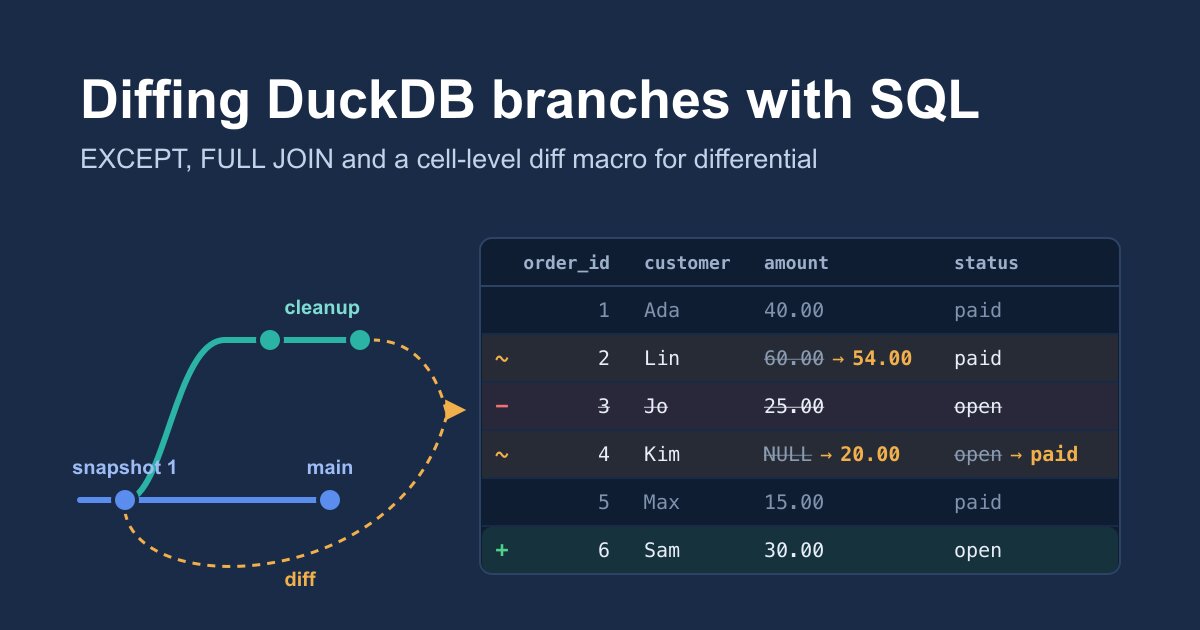
Diffing DuckDB branches and snapshots with plain SQL
Which rows changed on a branch, and which columns? Four queries, from a two-line EXCEPT to a reusable cell_diff macro.
After the launch of the differential DuckDB v2 extension, a user asked:
Would it also be possible to build diff views? Maybe it’s as simple as running a few SQL queries across different snapshots.
It is that simple. differential doesn’t need a diff function, because every branch and every snapshot can be attached as an ordinary DuckDB catalog, side by side in one session. From there, a diff is a SQL query across two catalogs. This post builds that query up in four steps, explains how each one works, and ends with a macro you can reuse for any table.
| Approach | Needs a key | Shows | Best for |
|---|---|---|---|
EXCEPT both ways | No | Rows that exist on only one side | Quick checks, tables without a key |
FULL JOIN on the key | Yes | Each row as added, removed or changed | Change reports |
| Changed columns | Yes | Which columns of a row changed | Narrow tables |
| Unpivot + join | Yes | One row per changed value | Wide tables, a reusable macro |
The setup#
We need a database with some history. Install the extension, point it at an unused directory, and create a small orders table with a snapshot:
INSTALL differential FROM community;
LOAD differential;
SET differential_repository = '/absolute/path/diff-demo';

ATTACH 'differential:retail' AS retail;
CREATE TABLE retail.orders (
    order_id INTEGER PRIMARY KEY,
    customer VARCHAR,
    amount   DECIMAL(10, 2),
    status   VARCHAR
);
INSERT INTO retail.orders VALUES
    (1, 'Ada', 40.00, 'paid'),
    (2, 'Lin', 60.00, 'paid'),
    (3, 'Jo',  25.00, 'open'),
    (4, 'Kim', NULL,  'open'),
    (5, 'Max', 15.00, 'paid');
CALL differential_create_snapshot('retail', name => 'baseline');   -- snapshot 1
Now a data cleanup happens on a branch, so that main stays untouched until someone has reviewed it. Each kind of change appears once:
CALL differential_create_branch('retail', 'cleanup', snapshot => 1);
ATTACH 'differential:retail' AS cleanup (BRANCH 'cleanup');
UPDATE cleanup.orders SET amount = 54.00 WHERE order_id = 2;                  -- corrected amount
DELETE FROM cleanup.orders WHERE order_id = 3;                                -- test order removed
UPDATE cleanup.orders SET amount = 20.00, status = 'paid' WHERE order_id = 4; -- missing amount filled
INSERT INTO cleanup.orders VALUES (6, 'Sam', 30.00, 'open');                  -- late order
Meanwhile, main doesn’t stand still:
INSERT INTO retail.orders VALUES (7, 'Eve', 12.00, 'open');Finally, attach snapshot 1 itself, read-only, under its own name:
ATTACH 'differential:retail' AS baseline (SNAPSHOT_VERSION 1);The session now has three catalogs of the same database: retail (main, writable), cleanup (the branch, writable) and baseline (snapshot 1, read-only). They share all unchanged data in the repository, so attaching them costs no copies.
First, pick the right “before”#
Before writing any diff, decide what you’re comparing against. Our question is “what did the cleanup change?”, and the obvious answer, comparing cleanup with main, is subtly wrong:
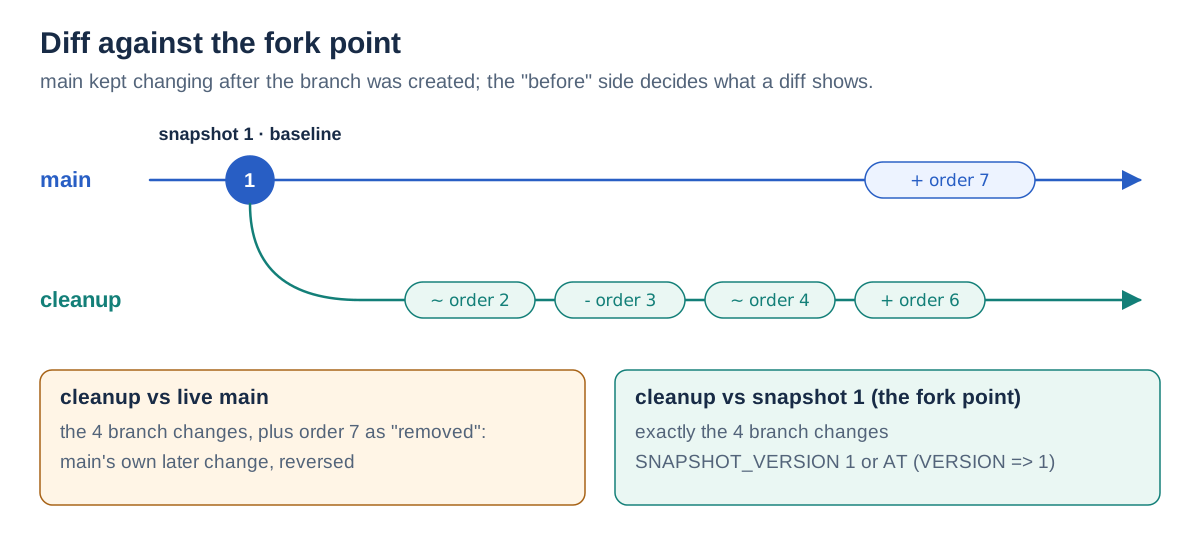
main received order 7 after the branch was created. Compared with live main, order 7 shows up as if the cleanup had deleted it. To see only what the branch did, compare it with the snapshot it was created from: its fork point. That’s why we attached baseline. Comparing with live main is still the right question for “what would change if I adopted this branch now?”, and the queries below work for both.
1. Row diff with EXCEPT#
The simplest diff needs no key and no knowledge of the columns:
SELECT 'only in baseline' AS side, * FROM (FROM baseline.orders EXCEPT FROM cleanup.orders)
UNION ALL
SELECT 'only in cleanup', *         FROM (FROM cleanup.orders EXCEPT FROM baseline.orders)
ORDER BY order_id, side;
┌──────────────────┬──────────┬──────────┬────────┬────────┐
│ side │ order_id │ customer │ amount │ status │
├──────────────────┼──────────┼──────────┼────────┼────────┤
│ only in baseline │ 2 │ Lin │ 60.00 │ paid │
│ only in cleanup │ 2 │ Lin │ 54.00 │ paid │
│ only in baseline │ 3 │ Jo │ 25.00 │ open │
│ only in baseline │ 4 │ Kim │ NULL │ open │
│ only in cleanup │ 4 │ Kim │ 20.00 │ paid │
│ only in cleanup │ 6 │ Sam │ 30.00 │ open │
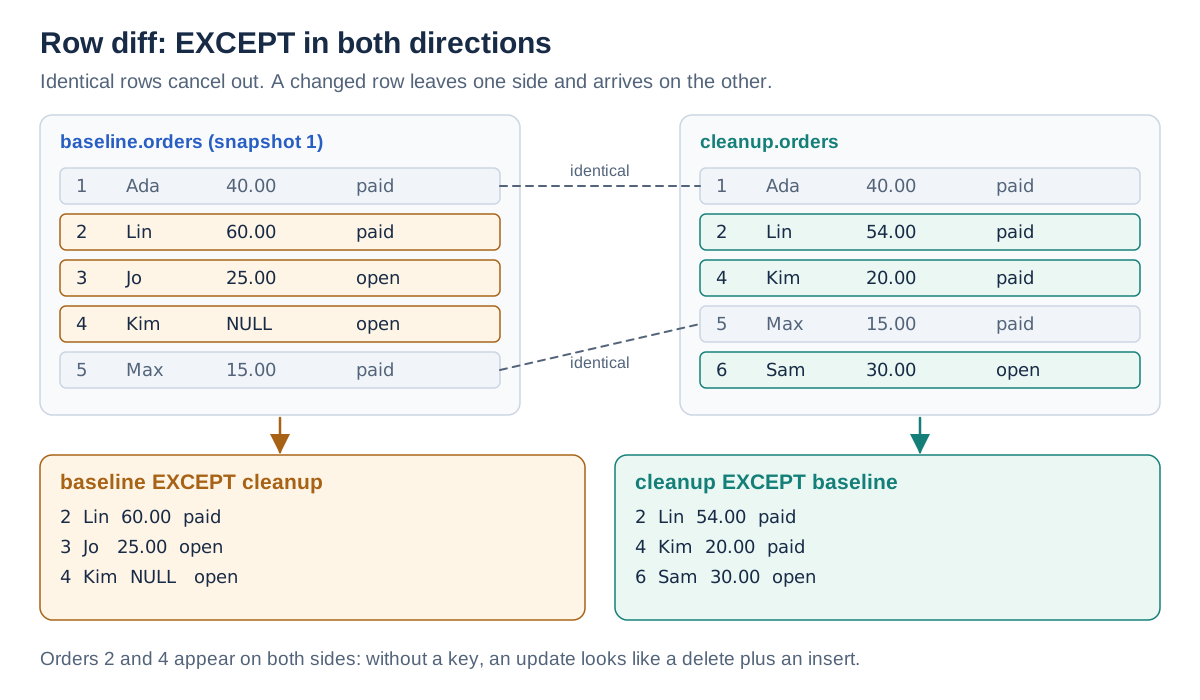
└──────────────────┴──────────┴──────────┴────────┴────────┘How it works. A EXCEPT B returns the rows of A that don’t appear anywhere in B. Running it in both directions gives the rows that exist only before and the rows that exist only after. UNION ALL stacks the two results, and the literal side column records which direction each row came from. Rows that are identical on both sides, here orders 1 and 5, cancel out. FROM x is DuckDB’s shorthand for SELECT * FROM x. The parentheses turn each EXCEPT into a subquery, so that the side label can be added in front of it.
A few details matter:
- NULLs compare as equal. Set operations treat two NULLs as the same value, so a row with a NULL that didn’t change still cancels out.
- Duplicates collapse.
EXCEPThas set semantics. For a table without a key, where identical rows can occur more than once, useEXCEPT ALL, which subtracts row counts. - Columns match by position. Both sides need the same number of columns in the same order. If a branch added a column, DuckDB stops with
Set operations can only apply to expressions with the same number of result columns. List the shared columns instead of*.
And there’s one real limit. Look at orders 2 and 4: each appears twice, once per side. Without a key, an updated row is indistinguishable from a deleted row plus an inserted one. If you want “order 2 changed its amount from 60.00 to 54.00”, the query has to know that both rows are order 2.
2. Keyed diff with FULL JOIN#
With a key, we can match rows directly:
SELECT coalesce(b.order_id, c.order_id) AS order_id,
       CASE WHEN b.order_id IS NULL THEN 'added'
            WHEN c.order_id IS NULL THEN 'removed'
            ELSE 'changed' END AS change,
       b.amount AS amount_before, c.amount AS amount_after,
       b.status AS status_before, c.status AS status_after
FROM baseline.orders AS b
FULL JOIN cleanup.orders AS c ON b.order_id = c.order_id
WHERE b IS DISTINCT FROM c
ORDER BY order_id;
┌──────────┬─────────┬───────────────┬──────────────┬───────────────┬──────────────┐
│ order_id │ change │ amount_before │ amount_after │ status_before │ status_after │
├──────────┼─────────┼───────────────┼──────────────┼───────────────┼──────────────┤
│ 2 │ changed │ 60.00 │ 54.00 │ paid │ paid │
│ 3 │ removed │ 25.00 │ NULL │ open │ NULL │
│ 4 │ changed │ NULL │ 20.00 │ open │ paid │
│ 6 │ added │ NULL │ 30.00 │ NULL │ open │
└──────────┴─────────┴───────────────┴──────────────┴───────────────┴──────────────┘How it works. A FULL JOIN keeps every row from both sides. Rows with the same order_id are paired up, and a row without a partner is paired with NULLs. So a NULL key on the before side means the row was added, and a NULL key on the after side means it was removed. coalesce picks whichever key is present.
The filter is the neat part. In DuckDB, a table alias used as a value, like b or c here, stands for the whole row as a struct. b IS DISTINCT FROM c therefore compares entire rows, no matter how many columns they have. Unlike <>, it’s NULL-safe: NULL against NULL counts as equal, and NULL against 20.00 counts as different. Pairs that are equal in every column are dropped, and what’s left is the diff.
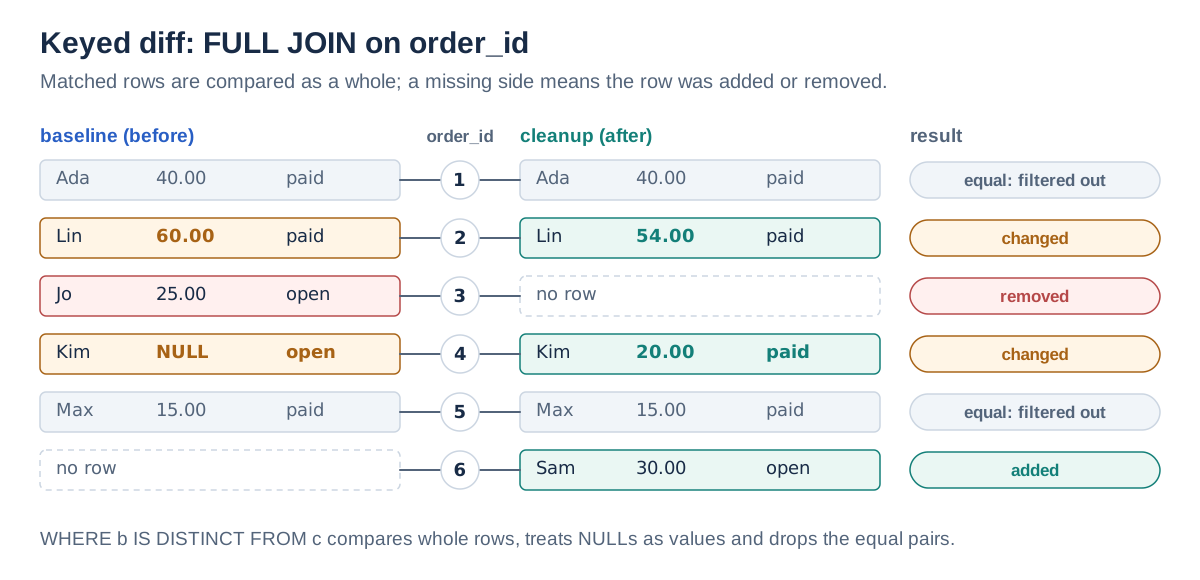
Swap baseline for retail and you get the diff against live main, with order 7 as removed. That’s the effect from the fork-point diagram.
3. Which columns changed?#
The keyed diff tells you that order 4 changed, but you still have to compare the values by eye. One more expression names the changed columns:
SELECT coalesce(b.order_id, c.order_id) AS order_id,
       CASE WHEN b.order_id IS NULL THEN 'added'
            WHEN c.order_id IS NULL THEN 'removed'
            ELSE 'changed' END AS change,
       CASE WHEN b.order_id IS NOT NULL AND c.order_id IS NOT NULL THEN
           concat_ws(', ',
               CASE WHEN b.customer IS DISTINCT FROM c.customer THEN 'customer' END,
               CASE WHEN b.amount   IS DISTINCT FROM c.amount   THEN 'amount'   END,
               CASE WHEN b.status   IS DISTINCT FROM c.status   THEN 'status'   END)
       END AS changed_columns
FROM baseline.orders AS b
FULL JOIN cleanup.orders AS c ON b.order_id = c.order_id
WHERE b IS DISTINCT FROM c
ORDER BY order_id;
┌──────────┬─────────┬─────────────────┐
│ order_id │ change │ changed_columns │
├──────────┼─────────┼─────────────────┤
│ 2 │ changed │ amount │
│ 3 │ removed │ NULL │
│ 4 │ changed │ amount, status │
│ 6 │ added │ NULL │
└──────────┴─────────┴─────────────────┘How it works. Each inner CASE returns the column’s name when its values differ, and NULL when they’re equal, because a CASE without ELSE yields NULL. concat_ws joins its arguments with a separator and skips NULL arguments, so only the changed names remain. The outer CASE limits the list to rows that exist on both sides; for added or removed rows, every column “changed”, and listing them all would be noise.
It works well, but you have to write one line per column. For a table with 40 columns, we want something generic.
4. Cell-level diff for any table#
The trick is to stop comparing wide rows and compare individual values instead. UNPIVOT turns every row into one (key, column, value) row per column. After that, every table looks the same, however wide it is:
WITH b AS (
    FROM (SELECT order_id, COLUMNS(* EXCLUDE order_id)::VARCHAR FROM baseline.orders)
    UNPIVOT INCLUDE NULLS (val FOR col IN (COLUMNS(* EXCLUDE order_id)))
), c AS (
    FROM (SELECT order_id, COLUMNS(* EXCLUDE order_id)::VARCHAR FROM cleanup.orders)
    UNPIVOT INCLUDE NULLS (val FOR col IN (COLUMNS(* EXCLUDE order_id)))
)
SELECT coalesce(b.order_id, c.order_id) AS order_id,
       coalesce(b.col, c.col)           AS col,
       b.val AS before,
       c.val AS after
FROM b FULL JOIN c ON b.order_id = c.order_id AND b.col = c.col
WHERE b.val IS DISTINCT FROM c.val
   OR b.order_id IS NULL OR c.order_id IS NULL
ORDER BY order_id, col;
┌──────────┬──────────┬────────┬───────┐
│ order_id │ col │ before │ after │
├──────────┼──────────┼────────┼───────┤
│ 2 │ amount │ 60.00 │ 54.00 │
│ 3 │ amount │ 25.00 │ NULL │
│ 3 │ customer │ Jo │ NULL │
│ 3 │ status │ open │ NULL │
│ 4 │ amount │ NULL │ 20.00 │
│ 4 │ status │ open │ paid │
│ 6 │ amount │ NULL │ 30.00 │
│ 6 │ customer │ NULL │ Sam │
│ 6 │ status │ NULL │ open │
└──────────┴──────────┴────────┴───────┘How it works, from the inside out:
COLUMNS(* EXCLUDE order_id)is a DuckDB star expression: it expands to every column except the key.::VARCHARcasts each of them, because onevalcolumn has to hold customer names, amounts and statuses alike.UNPIVOT … (val FOR col IN (…))turns each wide row into one row per column. The column’s name goes intocoland its value intoval.INCLUDE NULLSkeeps cells whose value is NULL. Without it,UNPIVOTdrops them, and order 4’s change from NULL to 20.00 would vanish from the diff.- The
FULL JOINnow matches on the key and the column name, pairing each value with its counterpart. - The
WHEREclause keeps the pairs whose values differ, NULL-safely, plus the cells of added and removed rows.
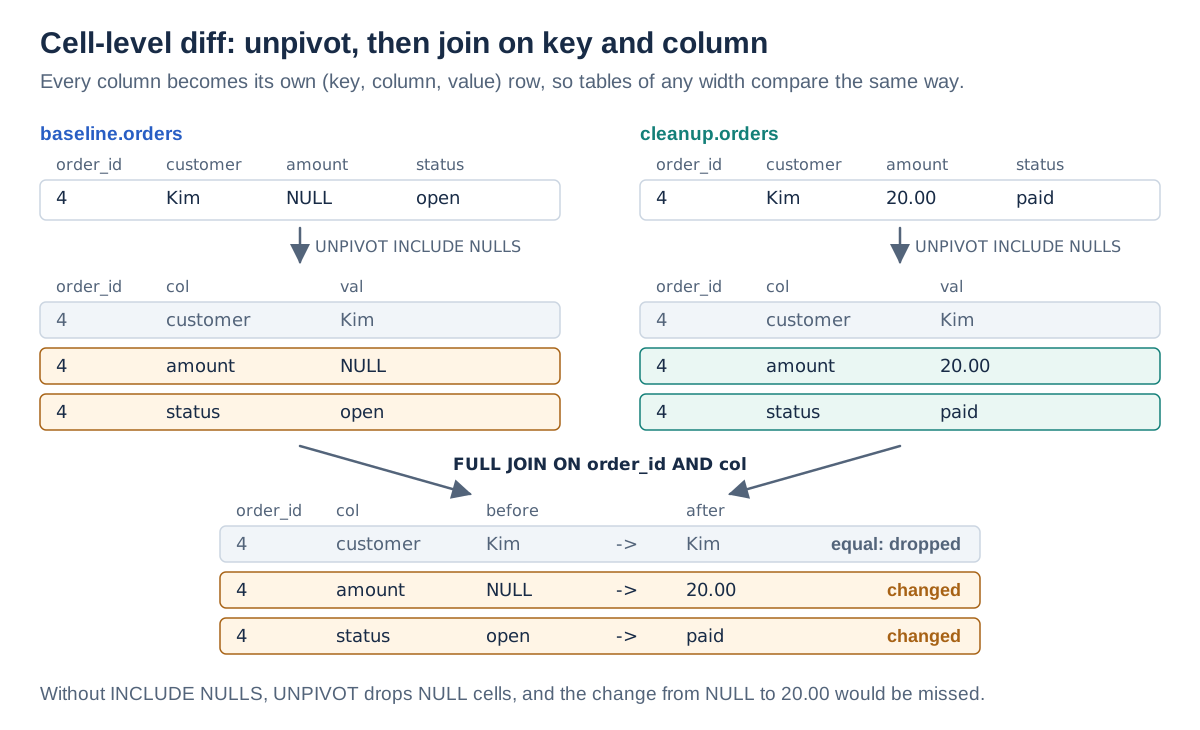
Two notes on this one. The values are compared as text. That’s exact as long as a column keeps its type, but if a branch changed a column from DECIMAL(10, 2) to DOUBLE, an unchanged 40.00 would show up as changed to 40.0. Keep the comparison in the original types, as in query 2, if that matters. And I used the SQL-standard UNPIVOT form on purpose: DuckDB’s own UNPIVOT … ON … INTO NAME … VALUE … form didn’t accept INCLUDE NULLS in my tests.
A reusable macro#
The cell-level query only mentions the table names and the key column, which makes it a good candidate for a table macro. query_table takes a table name as a string, and COLUMNS accepts a lambda that selects columns by name:
CREATE MACRO cell_diff(before_table, after_table, key_col) AS TABLE
WITH b AS (
    FROM (SELECT COLUMNS(lambda c: c = key_col) AS __key,
                 COLUMNS(lambda c: c != key_col)::VARCHAR
          FROM query_table(before_table))
    UNPIVOT INCLUDE NULLS (val FOR col IN (COLUMNS(* EXCLUDE __key)))
), a AS (
    FROM (SELECT COLUMNS(lambda c: c = key_col) AS __key,
                 COLUMNS(lambda c: c != key_col)::VARCHAR
          FROM query_table(after_table))
    UNPIVOT INCLUDE NULLS (val FOR col IN (COLUMNS(* EXCLUDE __key)))
)
SELECT coalesce(b.__key, a.__key) AS key,
       CASE WHEN coalesce(b.__key, a.__key) NOT IN (SELECT __key FROM b) THEN 'added'
            WHEN coalesce(b.__key, a.__key) NOT IN (SELECT __key FROM a) THEN 'removed'
            ELSE 'changed' END AS change,
       coalesce(b.col, a.col) AS col,
       b.val AS before,
       a.val AS after
FROM b FULL JOIN a ON b.__key = a.__key AND b.col = a.col
WHERE b.val IS DISTINCT FROM a.val OR b.__key IS NULL OR a.__key IS NULL;
Compared with query 4, the macro makes three changes:
- It selects the key by name.
COLUMNS(lambda c: c = key_col)selects the key column, whatever it’s called, and renames it to__key;COLUMNS(lambda c: c != key_col)selects all the others. DuckDB 2.0 requires thislambdasyntax: the oldc -> …arrow now stops with a deprecation error. - It labels each change.
changeis decided by whether the key exists on each side, not by the individual cell. That keeps the label right when the schema changed: if a branch adds a column, the new column’s cells show up aschangedfrom NULL to the default value, and the rows aren’t reported asadded. - It’s one call. Diffing a table is now a single line:
FROM cell_diff('baseline.orders', 'cleanup.orders', 'order_id')
WHERE change = 'changed'
ORDER BY key, col;
┌─────┬─────────┬────────┬────────┬───────┐
│ key │ change │ col │ before │ after │
├─────┼─────────┼────────┼────────┼───────┤
│ 2 │ changed │ amount │ 60.00 │ 54.00 │
│ 4 │ changed │ amount │ NULL │ 20.00 │
│ 4 │ changed │ status │ open │ paid │
└─────┴─────────┴────────┴────────┴───────┘Since the result is just a table, a review summary is one GROUP BY away:
SELECT change, count(DISTINCT key) AS rows, count(*) AS cells
FROM cell_diff('baseline.orders', 'cleanup.orders', 'order_id')
GROUP BY ALL
ORDER BY ALL;
┌─────────┬──────┬───────┐
│ change │ rows │ cells │
├─────────┼──────┼───────┤
│ added │ 1 │ 3 │
│ changed │ 2 │ 3 │
│ removed │ 1 │ 3 │
└─────────┴──────┴───────┘The macro takes catalog-qualified names, so it works across any attachments in the session. To keep it around, create it in a persistent database rather than the in-memory default.
Diffing snapshots#
Everything above works the same for two snapshots. Attach each one by number or name, then diff them:
CALL differential_create_snapshot('cleanup', name => 'cleanup_done');   -- snapshot 2

ATTACH 'differential:retail' AS v1 (SNAPSHOT_VERSION 1);
ATTACH 'differential:retail' AS v2 (SNAPSHOT_NAME 'cleanup_done');
FROM cell_diff('v1.orders', 'v2.orders', 'order_id');
Snapshot numbers belong to the database, not the branch, so this can compare snapshots taken on different branches. It also gives you a record of what a branch did, one you can reproduce long after the branch itself has moved on.
For a one-off query, AT time travel saves the extra ATTACH. One syntax detail: AT (…) can’t be followed directly by a table alias, so wrap it in a subquery:
SELECT count(*) AS changed_rows
FROM (FROM retail.orders AT (VERSION => 1)) AS b
FULL JOIN cleanup.orders AS c ON b.order_id = c.order_id
WHERE b IS DISTINCT FROM c;   -- 4
The same idea applies to S3: a branch head or an export attached from s3://… is a catalog like any other, so you can diff your local branch against what’s published before you publish again.
What it costs#
These are ordinary queries, so they read both tables in full. Branches and snapshots share their unchanged data in the repository, but a SQL diff doesn’t know that, and its cost grows with the size of the table, not the size of the change. That’s no issue for tables with thousands or millions of rows on a laptop. For very large tables, narrow both sides first, for example to the partition or date range the change touched, before diffing.
Wrapping up#
So yes, diff views are a few SQL queries:
EXCEPTin both directions for a quick look, with no key needed.- A
FULL JOINon the key withb IS DISTINCT FROM cfor a change report. UNPIVOT INCLUDE NULLSplus a join on key and column for a cell-level diff of any table, wrapped in a macro.- Compare against the fork point, such as a snapshot attached with
SNAPSHOT_VERSIONorAT (VERSION => n), when you want to know what a branch did. Compare against livemainwhen you want to know what adopting it would change.
Thanks to the user who asked. If you build something on top of this, a review UI or a CI check that fails on unexpected changes, I’d love to hear about it on GitHub.