Teaching coding agents the differential DuckDB extension with an Agent Skill
Coding agents are good at DuckDB, as long as the DuckDB they need is the one from their training data. A freshly released extension is a different story: the agent has never seen its functions, so it guesses, and the guesses look convincing.
The new Agent Skill for duckdb-differential closes that gap. Two days ago I wrote about duckdb-differential 1.0: versioned DuckDB databases with snapshots, branches and time travel, replicated through S3 with followers, WAL shipping, failover and shared writers. All of it is SQL, but it’s new SQL. No model has seen differential_recover_branch or FOLLOW true in its training data, and DuckDB 2.0 is new as well.
So instead of hoping the agent guesses right, the repository now ships the knowledge with the code.
The problem with brand-new extensions#
Ask an agent to “branch my DuckDB database and try a migration on it” without any context, and you typically get one of three things: a copy of the .duckdb file, a plausible-looking function that doesn’t exist, or a correct call in the wrong place. The last one is the sneaky one. Some examples of what goes wrong with duckdb-differential specifically:
- Restoring a branch that is still attached.
differential_restoreneeds the branch detached everywhere, otherwise you getactive_attachment_or_transaction. - Calling management functions inside a transaction. They only run in autocommit mode.
- Passing S3 keys to
ATTACH. Credentials come from a DuckDBTYPE s3secret, a named AWS profile or the SDK chain, never from options. - Expecting
AT (VERSION => n)to see individual commits. Time travel addresses public snapshots, and checkpoints are not snapshots unless you opt in. - Waiting for a head attachment to update. It’s fixed until you re-attach, unless it’s a follower.
None of these are hard once you know them. They’re just not knowable from the function names.
What an Agent Skill is#
An Agent Skill is a directory with a SKILL.md file: YAML frontmatter with a name and a description, followed by Markdown instructions, plus optional reference files. It’s an open format, and most coding agents read it by now.
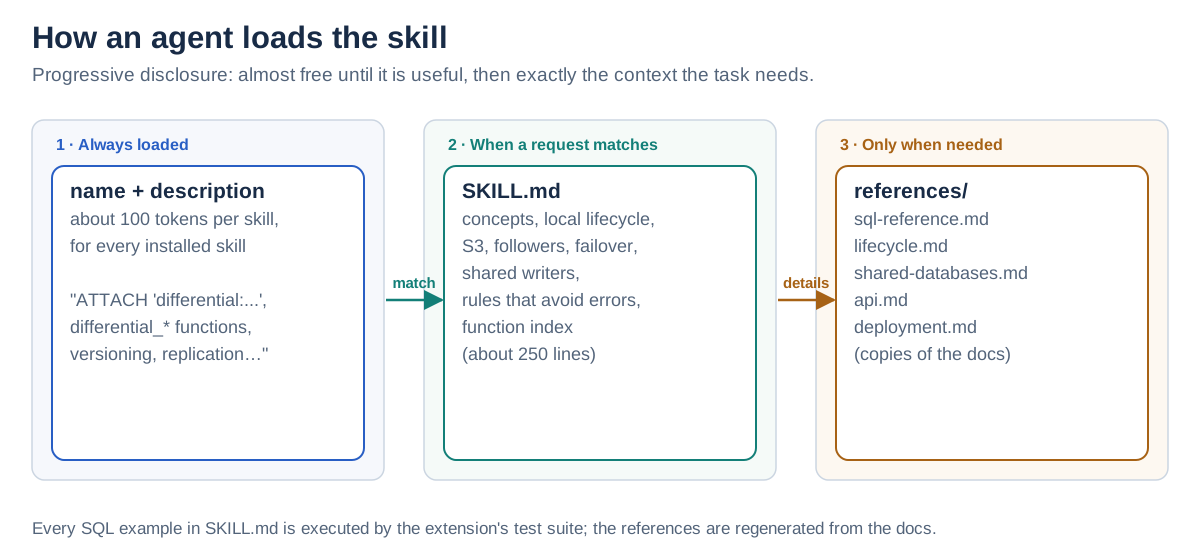
The trick is progressive disclosure. At startup, an agent only loads the name and description of every installed skill, about a hundred tokens each. When a request matches a description, it loads the full SKILL.md. Only if the task needs more does it open the reference files. So a skill costs almost nothing until it’s useful, and then it brings exactly the context the task needs.
What’s in the duckdb-differential skill#
The skill lives in the extension’s repository under plugins/duckdb-differential/skills/duckdb-differential:
duckdb-differential/
├── SKILL.md                    # the workflows, rules and a function index (~250 lines)
└── references/
    ├── sql-reference.md        # every statement, option, setting and function
    ├── lifecycle.md            # one database from creation to cleanup
    ├── shared-databases.md     # several writing hosts, conflicts, recovery
    ├── api.md                  # semantics, secrets, S3 costs, error categories
    └── deployment.md           # processes, users and hosts
SKILL.md itself is written for an agent, not as a manual. It contains:
- Concepts in one table: repository, database, branch, snapshot, clone, export and branch head.
- The local lifecycle as runnable SQL: create, snapshot, time travel, branch, restore, clone, drop, expire, clean up.
- S3 from the writer’s and the reader’s side: exports,
SHIP_WAL, branch heads, followers, and failover withdifferential_recover_branch. - Shared databases: two hosts writing the same database, and what to do on
branch_conflict. - A “choosing a setup” table that maps needs (“read replicas that stay current”, “survive the loss of the writer host”) to features.
- Rules that avoid most errors: the list from above, plus a few more, with the stable error prefixes an agent will see.
- A function index and pointers into the references.
The description is what makes an agent pick the skill in the first place, so it names the things people actually type: ATTACH 'differential:...', differential_* functions, versioning, branching, time travel, replication, sync and failover of DuckDB databases, leader/follower setups on S3.
Installing it#
Claude Code#
The repository is also a Claude Code plugin marketplace, so it’s one command:
/plugin install duckdb-differential --marketplace tobilg/duckdb-differentialOn older Claude Code versions, add the marketplace first:
/plugin marketplace add tobilg/duckdb-differential
/plugin install duckdb-differential@duckdb-differential
Claude picks the skill up automatically when a request matches, or you invoke it explicitly with /duckdb-differential:duckdb-differential.
Codex, Cursor, Copilot, Gemini CLI and friends#
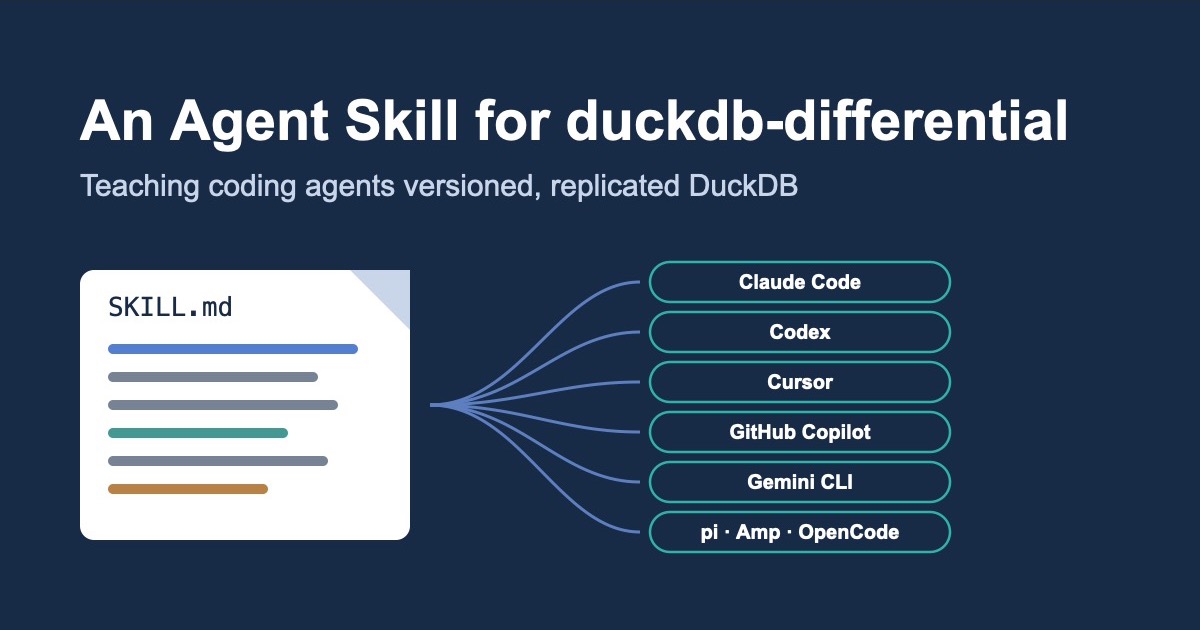
Most other agents look for skills in ~/.agents/skills/ (for all projects) or a project’s .agents/skills/. That’s true for Codex, pi, Amp, Cursor, GitHub Copilot, OpenCode, Gemini CLI and Devin Desktop / Windsurf Cascade. Copy the skill directory there:
git clone --depth 1 https://github.com/tobilg/duckdb-differential
mkdir -p ~/.agents/skills
cp -R duckdb-differential/plugins/duckdb-differential/skills/duckdb-differential ~/.agents/skills/
Restart the agent if the skill doesn’t show up (Gemini CLI has /skills reload, pi has /reload). For a single project, use that project’s .agents/skills/ instead, which also makes the skill available to everyone working on it. Cline uses ~/.cline/skills/ instead.
One command for many agents#
If you’d rather not copy directories around, the skills CLI from Vercel Labs installs a skill into whichever agents it finds on your machine, about 80 of them by its own count:
npx skills add tobilg/duckdb-differential        # into the current project, asks which agents
npx skills add tobilg/duckdb-differential -g     # for all your projects
-a cursor -a gemini-cli limits it to specific agents, and npx skills update pulls in a newer version of the skill later. It’s a third-party tool, so a few caveats: it needs Node.js 22.20 or later, it collects anonymous usage data unless you set DISABLE_TELEMETRY=1, and its install paths come from its own agent table, which doesn’t always match an agent’s docs (for Cline, I’d copy the directory to ~/.cline/skills/ by hand).
pi#
The repository is also a pi package:
pi install git:github.com/tobilg/duckdb-differentialThe README has a table with how each agent lists and invokes installed skills.
Using it#
You don’t need to mention the skill. Describe what you want, and the agent loads the skill when the request matches. A few prompts that work well:
- “Create a versioned database
salesfromexports/sales.duckdb, snapshot it asbaseline, and try the new pricing migration on a branch.” - “The import last night broke the numbers. Show me what changed since yesterday’s snapshot and roll
mainback.” - “Set up
ordersso that every commit goes tos3://my-bucket/lake/, and give the reporting host a read replica that stays current.” - “Our writer host is gone. Take over the
ordersdatabase on this machine.” - “Two CI jobs write the
metricsdatabase. Make that safe, and tell me what happens when they collide.”
For the replica prompt, the skill steers the agent to the intended setup: SHIP_WAL 'sync' (or 'async' with an interval) on the writer, a TYPE s3 secret instead of keys in ATTACH, and a follower on the reader:
-- writer
ATTACH 'differential:orders' AS orders (DATA_PATH 's3://my-bucket/lake/', SHIP_WAL 'async', SHIP_INTERVAL 1);

-- reporting host
ATTACH 'differential:s3://my-bucket/lake/heads/orders/main' AS orders_live (FOLLOW true, FOLLOW_INTERVAL 10);
It also knows the cost side, because the reference includes the S3 request cost table: an async branch committing continuously with a one-second interval costs about $13 a month in requests, a follower polling every ten seconds about $0.10. That’s the kind of detail an agent should mention before you put it into production, and now it can.
For the failover prompt, the agent reaches for differential_recover_branch(..., same_identity => true), and the skill makes it point out the part that matters: deciding when to fail over is yours. There’s no automatic failover, and the old writer should really be gone.
Of course, the skill makes an agent better informed, not infallible. Review what it does, especially anything that expires snapshots, drops branches or cleans up S3.
Keeping it correct#
A skill that drifts from the code is worse than none, because the agent trusts it. So the skill is part of the extension’s test setup:
- The examples are executed. Every SQL block in
SKILL.mdruns in the extension’s documentation test suite against an S3-compatible store, as written, alongside the examples of the SQL reference and the shared-databases guide. That includes the follower seeing new rows and the failover recovering every shipped commit. - The references are generated. They’re copies of the repository’s docs, written by
scripts/sync_skill.py. Links to docs that aren’t bundled point to GitHub, so an installed copy has no broken local links. - CI checks it statically. A separate CI job fails when a reference copy is stale, when
SKILL.mddoesn’t mention a function that the SQL reference documents, when the frontmatter breaks the Agent Skills rules, when a local link points outside the skill, or when the plugin and package manifests disagree on paths, names or versions. - Versions move together.
make bump-versionupdates the skill’s metadata and both manifests with the extension version.
The CI deliberately doesn’t install or run coding agents. The checks validate our files against the format; how each agent discovers skills follows its official documentation.
Wrapping up#
The skill turns duckdb-differential from “an extension your agent has never heard of” into one it can use correctly: local versioning, replicas, failover and shared writers, with the same rules a human would learn from the docs. It costs a hundred tokens until it’s needed, and the examples it learns from are tested like the code.
Install it, ask your agent for a branch or a replica, and let me know how it goes. Issues and ideas are welcome on GitHub.